
Live Chat for Website1.9 - Download
You'll be able to download in few seconds.
Publisher Description
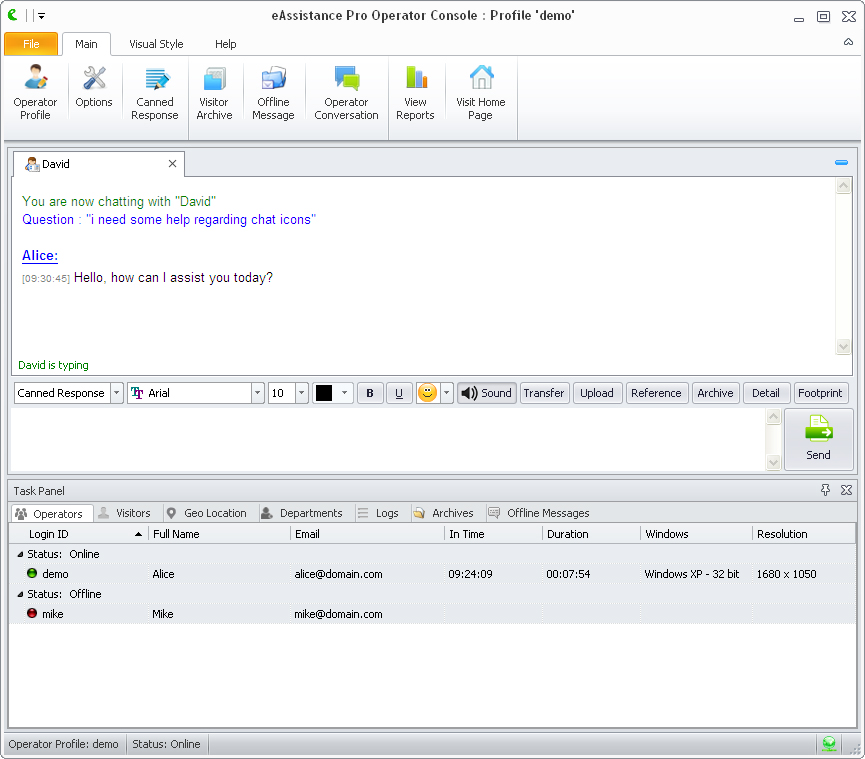
eAssistance Pro is an innovative live chat website tool, designed to carry out reliable business communication over the web. Integrating this live chat tool to your website can help you to monitor your visitors activities in details, which overall results in building powerful business strategies using real-time statistics. This live chat tool for website is highly adaptive and can be easily integrated to a host of platforms including Wordpress, Joomla, Blogger, Drupal, Zen Desk, Magento, Big Commerce, Salesforce, Zen Cart, EBay Pro Stores, and Shopify. Welcome your customers and visitors with an extraordinary website chat software features including customizable buttons, canned messages, greeting messages, start chat form etc.
Experience stress-free live chat for website tracking through visitor monitoring feature support that keeps ensures web-based monitor, tracking the most valuable customers, secured filtering by banning unwanted visitors and tracing visitors information like host name, country, IP address, navigation history etc. Send proactive chat invitations using this website chat software to initiate meaningful chat before visitors after navigating their respective interests upon your website. A live chat for website tool can prove really useful to create more meaningful connections and turning your potential visitors to loyal customers.
Despite the size, nature and geo-location of your organization, control your live chat for websites by defining respective chat operating hours for fixed chat availability and unavailability during non-working hours. eAssistance Pro is a highly secure live chat software, so try it on your own for free using its 15-day free trial version. For more details: www.live-chat-tool-for-website.eassistancepro.com
About Live Chat for Website
This Chat & Instant Messaging program is available in English. It was last updated on 29 September, 2026. Live Chat for Website is compatible with the following operating systems: Windows.
The company that develops Live Chat for Website is Live Chat Software. The latest version released by its developer is 1.9.
The download we have available for Live Chat for Website has a file size of 15.7 MB. Just click the green Download button above to start the downloading process. The program is listed on our website since 2015-04-06 and was downloaded 0 times. We have already checked if the download link is safe, however for your own protection we recommend that you scan the downloaded software with your antivirus. Your antivirus may detect the Live Chat for Website as malware if the download link is broken.
How to install Live Chat for Website on your Windows device:
- Click on the Download button on our website. This will start the download from the website of the developer.
- Once the Live Chat for Website is downloaded click on it to start the setup process (assuming you are on a desktop computer).
- When the installation is finished you should be able to see and run the program.
Program Details
System requirements
Download information
Pricing
Version History
version 1.9
posted on 2015-04-06
Live Chat for Website new version 1.9 features changes in the Chat visualization and also includes few minor bug fixes.
version 1.7
posted on 2014-04-14
Disclaimer
External Download
We do not host Live Chat for Website on our servers. We did not scan it for viruses, adware, spyware or other type of malware. This app is hosted by the software publisher and passed their terms and conditions to be listed there. We recommend caution when installing it.
The external download link for Live Chat for Website is provided to you by apps112.com without any warranties, representations or guarantees of any kind, so access it at your own risk.
If you have questions regarding this particular app contact the publisher directly. For questions about the functionalities of apps112.com contact us.
